System Documentation · Build Journal
Self-Hosted
Homelab

A privacy-first, production-grade homelab running across five servers - built and iterated through February to May 2026. Every architectural decision, automation script and security hardening choice documented here as a living build journal.
A five-server environment built around a single-ingress reverse proxy architecture - all external traffic enters through one node, with each server scoped to a distinct role. Cloudflare sits in front for DNS, TLS and bot protection. WireGuard provides encrypted remote access. NUT monitors the UPS and triggers a coordinated graceful shutdown on power loss.
All external traffic enters through host_1_home via Nginx Proxy Manager, which routes requests to backend services across the LAN. Only one node needs to be hardened for external exposure. Cloudflare sits in front with Bot Fight Mode, email obfuscation and proxied DNS. TLS certificates are issued via Let's Encrypt using the Cloudflare DNS challenge - no port 80 exposure required.
A Cloudflare Tunnel replaces DDNS-managed A records for all web-facing subdomains. The server initiates an outbound-only connection to Cloudflare over port 443 - home IP is never exposed in public DNS. Force SSL is disabled on all tunneled NPM proxy hosts; Cloudflare terminates SSL at the edge and the tunnel carries HTTP to NPM internally.
Four browser-based SSH endpoints are exposed via Cloudflare Zero Trust - email OTP authentication, country-restricted to two regions, 6-hour session. No SSH client installation required for emergency access from any device.
Two Pi-hole instances run across the fleet - primary on host_1_home (Docker), secondary on host_5_power (DietPi native). The router's DHCP server assigns both as DNS servers for all LAN clients, with the secondary as pure failover - not active-active.
Both instances use the Hagezi Multi Pro blocklist alongside StevenBlack. DNS queries are forwarded upstream through dnscrypt-proxy 2.1.15 running on each host, wrapping all queries in HTTPS to Cloudflare's DoH endpoint - ISP cannot see resolved domains.
Pi-hole is deployed as opt-in per device rather than a network-wide blanket, protecting household appliances and guests from DNS filtering side-effects. Corporate devices using Zscaler tunnel their DNS through the VPN automatically - no conflict.
WireGuard runs natively on host_1_home as a system service, providing encrypted remote access to the full homelab subnet. Peers include the Windows laptop, Chromebook and Android phone - each provisioned with individual keys. SSH access to all servers is gated to LAN and WireGuard subnet only.
Portainer CE 2.39.0 LTS is deployed as the unified container management layer across the homelab, with Gitea 1.26.2 running co-located on host_2_cloud as the local Git backend for all stack definitions. Every Docker service across all four hosts is defined as a Git-backed compose stack, version-controlled in Gitea and deployed through Portainer.
Portainer Server runs on host_2_cloud - selected for its 32 GB RAM headroom. Standard Portainer Agents are deployed on host_1_home, host_3_mail and host_4_backup, each reachable by the server over the LAN on a custom port. host_5_power is excluded entirely. It carries no Docker runtime and Alloy runs there as a native binary. All compose files live under a specific location on each host, with one dedicated Gitea repo per host.
Stack secrets are managed as Portainer environment variables - no
.env files remain on disk.
Portainer and Gitea both use bind mounts, covered by the existing rsync backup job on sunnybackup. Portainer is
accessible via NPM reverse proxy in a subdomain - no public exposure.
Mailcow on sunnymail is deliberately Portainer-unmanaged. Its update script
(mailcow-update.sh)
is tightly coupled to code location and runs its own docker compose
internally - Portainer managing this stack would conflict with the native updater and break the update path.
Mailcow retains its own systemd startup handling; all other stacks restart cleanly via Docker restart policy after reboot.
restart: unless-stopped -
clean separation removes the race condition between docker-compose-startup.service and Portainer on reboot.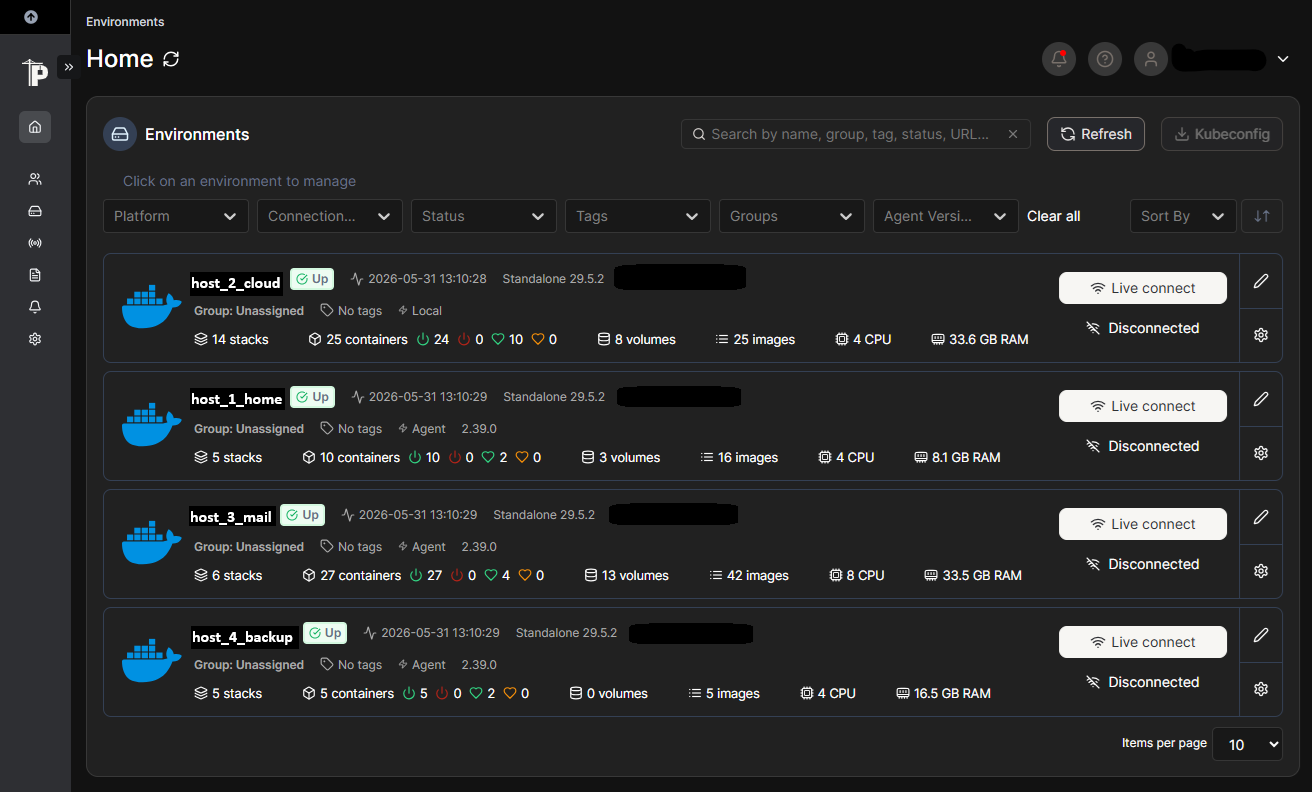
All services are self-hosted, accessible over HTTPS via Cloudflare Tunnel - home IP never exposed in DNS. These might not open in corporate networks as they are hosted on a different domain.
LAN and WireGuard VPN access only - not publicly exposed. Click any card for details.
Nextcloud is the primary cloud storage platform - a full self-hosted alternative to Google Drive, running on Docker with an 8 TB external data volume managed via LVM. The LVM layout was designed from the start to allow incremental expansion without service interruption.
Immich runs alongside Nextcloud for photo management, deliberately separated to leverage its machine-learning photo features and superior mobile experience. External libraries mount Nextcloud photo folders as read-only - single source of truth, with Immich's AI features on top.
Jellyfin runs in host network mode for smooth local media streaming, accessible on the home network or remotely via WireGuard. DocBot is a private RAG pipeline - Ollama, Mistral 7B, FastAPI, ChromaDB - for querying personal documents without sending data to external APIs.
Mailcow manages the complete email stack - DKIM, SPF and DMARC all verified and active. Outbound mail routes through a Brevo SMTP relay to solve residential IP deliverability without months of reputation building. A dedicated 500 GB LVM volume is allocated for mail data with growth headroom reserved.
Paperless-ngx runs on the same server for document management with OCR - all household documents, receipts and correspondence are ingested, tagged and made searchable. Public access via Cloudflare Tunnel at a dedicated subdomain.
A fully self-hosted feedback widget deployed across both sites. Visitors can leave a thumbs up/down rating and a comment - all data stays on-premises with zero third-party exposure. Formspree was evaluated and rejected to avoid handing visitor data to an external service.
The API runs as a Docker container on host_2_cloud, exposed via Cloudflare Tunnel through NPM. Submissions are stored in SQLite and trigger an email via the self-hosted Mailcow stack. CORS is locked to both domains, rate-limited to 5 submissions per IP per hour. The mail password is injected at container startup via an entrypoint script reading from an .env file - never baked into the image.
SSH runs on a non-standard port across all servers with key-based authentication only - keys provisioned from known devices (laptop, Chromebook, phone). Root login is disabled everywhere. Fail2ban is configured with a 3-retry threshold and an aggressive ban duration, with LAN subnet whitelisted to prevent self-lockout. The recidive jail escalates repeat offenders.
UFW rules on the three Ubuntu servers restrict all traffic to expected ports only - SSH, HTTP/HTTPS and service-specific ports scoped to LAN or NPM IP only. host_5_power uses nftables with a drop-all policy; only DNS, SSH and Pi-hole ports are open. IPv6 is disabled across all servers - no global IPv6 address is assigned.
Docker services on host_2_cloud are bound to 127.0.0.1 for internal-only services - DocBot backend and Ollama were unintentionally exposed on 0.0.0.0 and corrected during hardening review.
A structured vulnerability and penetration test was run across all 7 public-facing domains using nmap, sslyze, nikto and a full HTTP security header audit. SSL/TLS was scanned against the origin directly (bypassing Cloudflare) via LAN IP. All findings were triaged, fixed or formally accepted with rationale.
| Header | Static Sites | Cloud / Photos | |
|---|---|---|---|
| Strict-Transport-Security | ✓ 12mo | ✓ | ⚠ 6mo |
| X-Frame-Options | ✓ | ✓ | ✓ |
| X-Content-Type-Options | ✓ | ✓ | ✓ |
| Content-Security-Policy | ✓ | accepted | accepted |
| Referrer-Policy | ✓ | accepted | ✓ |
| Permissions-Policy | ✓ | accepted | accepted |
Next VAPT scheduled: October 2026
A Green Cell AIO 600VA UPS is connected via USB to host_5_power, which acts as the NUT primary server. All four main servers are NUT secondaries, polling the primary every 5 seconds. On power loss, a 10-minute countdown begins - if mains is not restored within that window, a coordinated graceful shutdown fires across all four servers simultaneously via SSH, then host_5_power powers off 30 seconds later.
The UPS does not report battery.charge -
only battery.voltage. A voltage-based low threshold is
set via override in the NUT driver config. USB cable disconnection has a 1-hour grace period to avoid false shutdowns from accidental cable
disconnects. Total time from outage to all servers off is approximately 12 minutes.
This system replaced the previous ping-based Power Sentinel watchdog, which was a dead man's switch dependent on continuous network reachability. NUT is purpose-built for UPS integration and provides more reliable shutdown semantics.
After a graceful shutdown or Docker package upgrade, containers were not restarting automatically despite restart: always policies. Two root causes: Docker package upgrades via the weekly maintenance script restarted the daemon and wiped container state; and Docker's policy was not restoring state reliably on boot across all machines.
Three fixes were applied fleet-wide. A systemd oneshot service fires on every boot, waiting for Docker to fully initialise before bringing up all stacks in order. The ubuntu-update.sh maintenance script was updated to restart all stacks after any Docker package upgrade. Live restore is enabled on all three servers so containers survive daemon restarts without stopping.
host_2_cloud has an additional boot dependency - Docker itself is held until all five LVM data mounts are confirmed ready, preventing container startup races against slow disk initialisation.
Each server runs an independent biweekly maintenance script on a fixed Sunday schedule. The cycle has four phases: a 24-hour advance notice email on Saturday, a maintenance-start announcement on Sunday, an ordered Docker stack shutdown followed by reboot and a post-reboot health report emailed to the ops log recipients.
A biweekly gate function inside each script anchors to a fixed start date - cron fires every weekend, but the script exits silently if it is not a maintenance week. All scripts send email via msmtp routing through the self-hosted Mailcow stack. The post-reboot report includes a live docker ps output so any failed containers are immediately visible.
A full self-hosted observability stack is deployed across all five servers. Prometheus handles metrics collection, Loki aggregates logs with 30-day retention and Grafana provides unified dashboards and alerting - all running centrally on host_1_home. Grafana Alloy is the unified agent on every node, shipping both metrics and logs to the central stack over the LAN.
Remote Alloy agents run as Docker containers on host_2_cloud, host_3_mail and host_4_backup. On host_5_power (DietPi, no Docker runtime), Alloy runs as a native ARM64 binary with a systemd service. A standalone cAdvisor container runs on all Docker servers for per-container metrics - required because Alloy's embedded cAdvisor does not support cgroup v2 with systemd driver on Ubuntu 24.04.
A lightweight docker-api service runs on each Docker server, exposing a live docker ps feed as JSON. This powers the Fleet Dashboard - a LAN-only overview at a dedicated subdomain showing live CPU, RAM, temperature, uptime and container count per server. Clicking any server card opens a drill-down modal with per-container CPU, RAM, port mappings and uptime. Auto-refreshes every 30 seconds, accessible via WireGuard from anywhere.
Grafana is accessible on the LAN only - no public Cloudflare record - so observability data stays fully off the public internet. SMTP alerting routes through the self-hosted Mailcow stack.
Three alert rules are active, all routed to email via the self-hosted Mailcow stack.
| Data Source | host_1_home | host_2_cloud | host_3_mail | host_4_backup | host_5_power |
|---|---|---|---|---|---|
| Node metrics (CPU/RAM/disk) | ✓ | ✓ | ✓ | ✓ | ✓ |
| Docker container metrics (cAdvisor) | ✓ | ✓ | ✓ | ✓ | - |
| Fail2ban logs | ✓ | ✓ | ✓ | ✓ | - |
| UFW / firewall logs | ✓ | ✓ | ✓ | ✓ | - |
| Syslog | ✓ | ✓ | ✓ | ✓ | - |
| Pi-hole metrics | ✓ | - | - | - | ✓ |
| Mail logs (Mailcow) | - | - | ✓ | - | - |
| NPM proxy logs | ✓ | - | - | - | - |
host_4_backup is a dedicated ThinkCentre M910q running as the sole backup destination for the fleet. A 1 TB ext4 partition on a WD Red NAS SSD is mounted at a fixed path and serves as the single landing zone for all inbound backup jobs. A further ~800 GB remains unallocated on the drive, reserved for future growth without repartitioning.
All backups use rsync over SSH in a push model - each source server initiates its own transfer on schedule, writing to a dedicated subdirectory on host_4_backup. This keeps the backup node passive: it never reaches out to source servers and requires no knowledge of their internal layout. Delta-only transfers keep transfer windows short even for large data volumes.
All jobs run hot against host filesystem paths - no containers are stopped or paused during backup. For the mail stack specifically, rsync reads directly from Docker volume paths on the host filesystem, bypassing the mail daemon entirely and avoiding the UID remapping issues that container-level stops can trigger.
Four independent backup jobs, each scoped to one source server and running on its own cron schedule. All land on host_4_backup.
| Source | What | Cadence |
|---|---|---|
| host_3_mail | Mail stack - vmail, database, SOGo data, config | Every 4 hours |
| host_3_mail | Document management - media, data, database, inbox | Daily 01:45 |
| host_2_cloud | Docker volumes + service configs | Daily 03:00 |
| host_2_cloud | Personal cloud storage - selected folders only | Daily 03:00 |
| host_1_home | Service configs + Monitoring stack volume | Daily 02:00 |
Several data categories are deliberately excluded from backup. All are either fully rebuildable or carry insufficient value to justify the transfer and storage cost.
| Data | Source | Reason |
|---|---|---|
| AI model weights (LLM) | host_2_cloud | Fully rebuildable via ollama pull - 4.4 GB, not worth transfer cost |
| AI photo model cache | host_2_cloud | Auto-regenerated on service start - ~800 MB |
| Screenshots | host_2_cloud | Transient / low value - excluded by design |
| WhatsApp media exports | host_2_cloud | Large volume, already retained on device - excluded to save space |
| Mail spam/AV databases | host_3_mail | Auto-regenerated by Rspamd and ClamAV on startup |
| Mail cache (Redis) | host_3_mail | In-memory cache - rebuildable, no persistent value |
One dedicated backup script per source server, running as root via cron. All scripts share a common pattern: Berlin timezone logging, clean trap handling on interruption and email notification on success or failure via the self-hosted mail stack.
| Script | Runs on | Covers |
|---|---|---|
mailcow-backup |
host_3_mail | Mail stack volumes + config |
paperless-backup |
host_3_mail | Document management volumes |
cloud-backup |
host_2_cloud | Docker volumes, service configs, cloud storage folders |
home-backup |
host_1_home | Service configs, observability stack volume |